How to bypass IE warning messages when accessing an html file from local file system
I usually code my HTML/JavaScript in a simple text editor like notepad++. I usually open it in IE ( Internet Explorer) or FF to test it. Firefox doesn't have any problems in opening the local files. But IE doesn't believe my local files. Every time I open a local html file using IE I will get a warning.
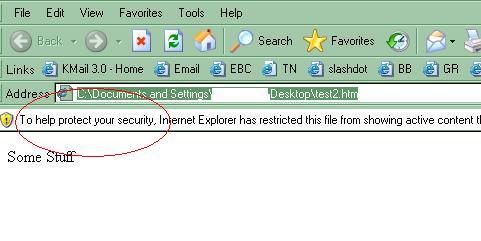
I need to unblock it for IE to execute javascript. I found a simple solution to fix this when working offline. Add the this line to top of your html file<!-- saved from url=(0013)about:internet -->
This line will allow IE bypass the security warning and execute the JavaScript. For more information on this go to microsoft technet.









Nice tip! This means shorter covering emails to clients while sending across DHTML screen prototypes…
yup
Now that solves a nagging problem I’ve never spent the time to remedy, thanks so much!
Wouldn’t it take longer to add this line into your code and then remove it than it would take to just click “Allow Blocked Content” in ie?
I’d like to find a security setting in the browser itself that would allow me to never display that message… and that’s it.
@Jonathan: I am not sure you want to remove it if we are creating only wireframes.
If we want to then have simple macro to add/remove this line from the top of all html files in a folder. A simple wsscript would do this job.
Hi,
I am using IE 7.It seems that “” doesnt work in IE 7.I am getting the warning msg .Any help thanks
Hi,
I am using IE 7.It seems that “saved from url=(0013)about:internet ” doesnt work in IE 7.I am getting the warning msg .Any help thanks
I have not tried in IE7.1. Will let you know once I try.
very useful tip. works in IE8.
awesome!!
WOW just what I was searching for. Came here by searching
for cheap seo company toronto
my webpage; toronto web design (pen.io)