Tagged: Code

KoboToolbox to CouchDB 1

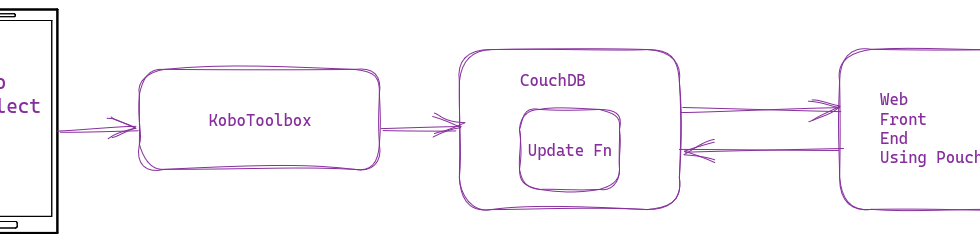
Connecting KoboToolbox to CouchDB for Real Time Data

I have recommended KoboToolbox (and KoboCollect) for nonprofits, and we also use it at DataMeet to collect all kinds of data, including IDVC. For IDVC, I pull the data from KoboToolbox, do some massaging, and then upload it to CouchDB. It works very well. But what if I want to make this whole process real-time? 
0

Creating Dynamic PDF reports using Jinja and Gotenberg

I use Jinja2 in a variety of ways. Sometimes to create SVGs and other times to create reports. Recently there was a requirement to create PDF reports as part of a service. Since the app already uses Python and Jinja2, we used that to generate PDF reports. Using data and Jinja2, we created...

Web-Powered Workflows: Fetching and Running Digdag Workflows with Callbacks 0

Web-Powered Workflows: Fetching and Running Digdag Workflows with Callbacks

In Digdag, workflows are typically defined in YAML files with a “.dig” extension. Developers usually write these workflows, which consist of tasks to be executed. However, tasks can also be added dynamically using the Digdag Python API or by downloading a “.dig” file from a remote HTTP server and incorporating it as a subtask. This approach is useful when a web service or app generates customized workflow files based on web app conditions, allowing the workflow logic to be managed externally. You can add webhooks to make it reactive.

0

Simple CGI programming

A simple HTTP server serves static HTML, Javascript, CSS, Images, etc. Sometimes you need a bit of dynamic content from the server-side. There are simple microframeworks to mega frameworks to achieve this. You could use any of these available web frameworks on the server side. But let’s say you don’t have access to any of those frameworks, and you want it to be simple and lightweight. You could try CGI.

Or you are just a web geek and want to spend an hour on old but interesting technology.

0

How to Use Podman to run Workflows in Digdag

I often try to use Docker with my Digdag workflows. That way, we can keep the dependencies clean and separate for each DAG. I have blogged about it in detail before. Now instead of Docker, I can use Podman, by just making one small change.