Getting Started with Reticulum
I have been looking for a network protocol stack that can be run in addition to the regular TCP/IP network at TVC. Kiran has been exploring Meshtastic, mainly to connect the sensors to the Home Assistant that TVC runs. We have very poor cell phone connection and two BSNL wired internet connections, one of which is mostly down. Kiran has been laying OFC across TVC to share that network. I took a bit off-route and started looking for a protocol that can work in adverse conditions; I was okay with high latency and extremely low bandwidth. Reticulam doesn’t make the OFC and network that is already setup at TVC. It works alongside TCP/IP, including over existing internet connections.
Reticulum is the cryptography-based networking stack for building local and wide-area networks with readily available hardware. Reticulum can keep operating even in adverse conditions with very high latency and extremely low bandwidth.
Unlike Meshtastic or MeshCore, Reticulam is not a messaging platform (though you can add messaging on top of it). It’s a full replacement networking stack. You can have many applications on top of it once it’s running. Ordinary TCP/IP applications do not automatically run on it.
In Reticulum, every machine or node is identified by a pair of signing and encryption keys (transferable). I fact a machine can have more than one. This is used for both encryption and routing. Both key pairs use 32-byte keys. Together, the two public keys form a 64-byte public identity. But to identify the node, Reticulum uses an identity hash, which is derived from these public keys.
hash = SHA256(encryption public key + signing public key )
identity_hash = first_16_bytes(hash)
That is 128 bits, or 16 bytes, or 32 hex characters. This is what you usually see everwhere to identify the node.
To route the traffic, Reticulum uses a destination hash, which is an address of an application endpoint in Reticulum. So different applications within the same node get different destination hashes. A normal identity-backed destination is derived from:
- Application name, such as lxmf.
- Aspects that identify the service, such as delivery.
- Identity hash, identifying the key holder.
lxmf is a messaging protocol built on top of Reticulum.
name_hash = SHA256(b"lxmf.delivery")[:10] # First 10 bytes
destination_hash = SHA256(name_hash + identity_hash)[:16]
For rncp (file transfer utility like scp), the destination name is rncp.receive:
- Application: rncp
- Aspect: receive
The calculation is similar:
name_hash = SHA256(b"rncp.receive")[:10]
destination_hash = SHA256(name_hash + identity_hash)[:16]
This is how different applications on the same node can have different destination addresses. Packets are delivered to these destination addresses.
Applications can send an announce for their destination. An announce includes the destination’s public identity information and a signature that others can verify. As it travels through the network, nodes learn which direction that destination can be reached from and how many hops away it is. If a node does not know a path, it can request one.
Reticulum uses Transport nodes to carry traffic between other nodes, sometimes across different interfaces. Not every node needs to be a Transport node. Ideally a stationary, always on and available nodes can be a Transport node. A network needs relatively small number of Transport nodes.
Reticulam doesn’t have IP addresses, DNS names, etc. Everything is handled by cryptographic keys or hashes. Traffic is also encrypted end-to-end. All encryption keys are ephemeral, and communication offers forward secrecy by default. All of this is handled at the network level, and you don’t have to do anything as an application developer. The Reticulam protocol doesn’t support store-and-forward; the packets will be dropped if the destination couldn’t be reached or is down.
The network can use available mediums (like links, called Interfaces) to ship the packets. Your network can be heterogeneous based on your design. It can use SerialInterface (RS-232/485 line, serial radio modem, or XBee-style transceiver), PipeInterface (pipes packets through stdin/stdout), Internet (TCP), Local LAN, Ethernet or WiFi, automatically using IPv6 multicast. Bluetooth or other radio (LoRa, VHF/UHF/HF using KISS, AX.25 ), etc. Basically, it can use any medium as long as they transmit packets. You can configure more than one interface.
To get started, we will install rnsd (Reticulam Network Service Daemon). I installed it using UV, you can do pip if you want. It will install the rnsd and other utilities. Once installed, run rnsd to create a key pair. It usually creates a key pair in your home directory at ~/.reticulum. All your network keys are stored here. You can also edit ~/.reticulum/config to add interfaces. It comes with AutoInterface for local LAN/Wifi connectivity. But you can add one or two TCPClientInterface so you can send packets across the internet. You can start with an Interface provided by the community. It’s the easiest Interface to set up. If you change the config at any time, you need to restart RNS.
# using pip
pip install rns

# using uv
uv tool install rns

# run rnsd to create keys
rnsd
After that, you can create a system service if you’d like to run it as a service. I want it to run all the time, so I set it up that way. If not, you can start it manually whenever you want. You can check the status and traffic flow using `rnstatus`. It should show the status of all Interfaces and the traffic flowing through each one. Now you are on the network and ready.
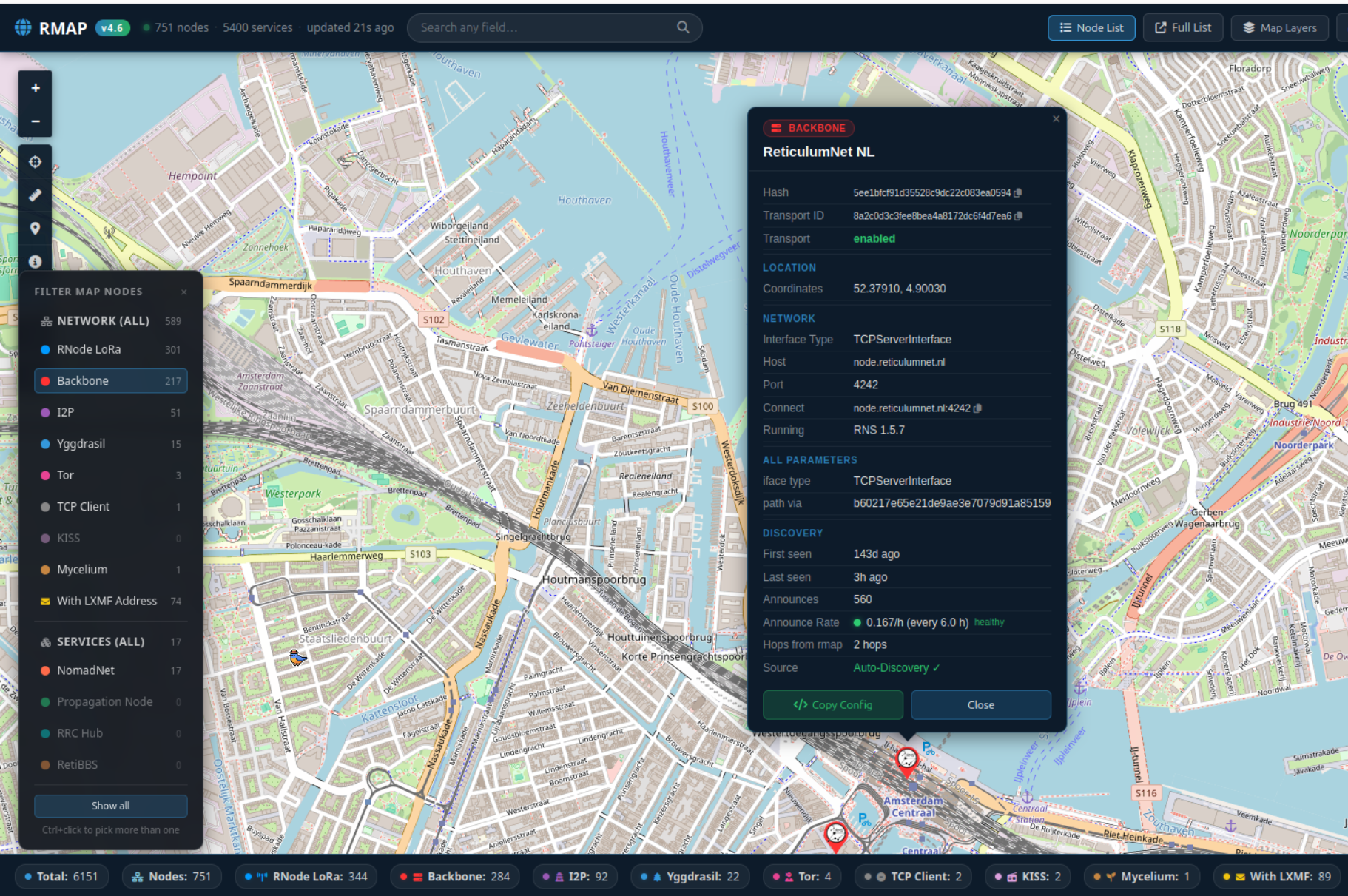
To test you can pickup a node on Rmap, like this and see the path to it by running the command.
rnpath 5ee1bfcf91d35528c9dc22c083ea0594 # destination hash
It will print.
Path found, destination <5ee1bfcf91d35528c9dc22c083ea0594> is 7 hops away via
<d7db22f63b453c23bb0688dde565b7c1> on BackboneInterface[PSHP G01/dyn1.intatec.com:4242]
Now you know you are on the network and can reach others on the Reticulam Network.
Next, install a useful app that can do something on this network, perhaps short messaging?